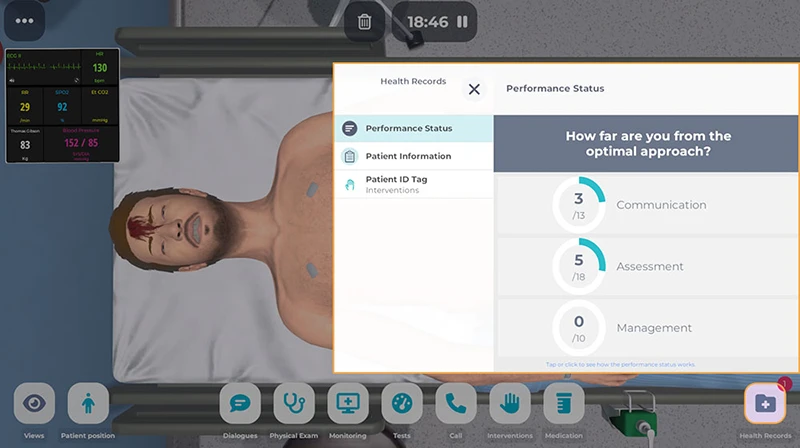
The Performance Status in Body Interact is composed of three numerical indicators: Communication, Assessment, and Management. These show how closely your actions align with the optimal clinical approach defined by the clinical reviewer for the scenario.
Understand the Performance Status
How It Works
The optimal approach used for calculating these indicators considers only the first-priority items defined in the clinical scenario. These items are based on international guidelines and the patient’s state at admission.
During the simulation, these numbers might change as the scenario flow evolves. Your decisions may trigger new first-priority actions defined by the clinical reviewer, requiring you to adapt your approach in real-time. If the patient’s condition shifts, new “must-do” tasks will be added to your plate.
Where To Find It
You’ll find the Performance Status indicators inside the Health Records menu. Just select the Performance Status tab to reveal your real-time numerical indicators.
These indicators are designed to help you drive your performance during the simulation. To see your Global Score and the results for each category, you’ll need to access the Feedback area at the end of the scenario.
Who Can See It?
Learners: You can see the Performance Status in scenarios included in the “Today’s Patient” section, as well as in scenarios assigned through Training Sessions, where educators have enabled Feedback and Metrics.
Educators: You can see the Performance Status in all your scenarios included in the “Your Scenarios” section, and in scenarios included in Training Sessions, that were assigned with visible Feedback and Metrics.
Note: The Performance Status is unavailable in Evaluation Sessions, in scenarios in the Consultation Office, or when AI-driven conversations are active.
Was this article helpful?
YesNo